
Enroll people automatically: the Inbox Academy Zapier app
Most onboarding sequences fail for a boring reason. Someone has to remember to start them.
A new hire is added to the HR system on Monday. The onboarding course is supposed to begin on day one. In practice it begins whenever someone in HR gets around to exporting a list and pasting it into a platform, which might be Thursday, or might be next month, when three more people have piled up and it gets done as a batch. The content is fine. The timing is nobody's job.
Our Zapier app closes that gap. When a person appears in whatever system you already treat as the source of truth, they get enrolled in Inbox Academy, and their sequence starts from that moment.
What the app does
The Inbox Academy Zapier app exposes an Enroll Learner action. You point it at a course, hand it an email address and a course slug, and it creates the enrollment. Everything after that is Inbox Academy's job.
It pairs with any of Zapier's several thousand triggers. The one we'll walk through is a new employee in BambooHR, but the pattern is identical whichever system you start from.
The example: BambooHR to Inbox Academy
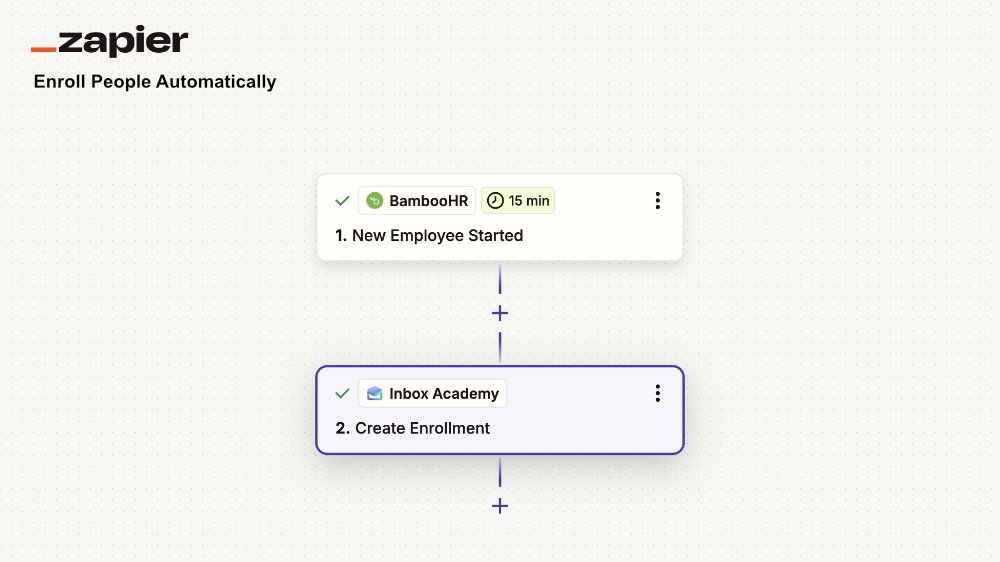
Trigger - BambooHR, New Employee
BambooHR gives you two triggers worth knowing about, and the choice between them matters more than it looks.
New Employee fires when the record is created in BambooHR.
New Employee Started fires on the employee's start date.
If your onboarding course is pre-boarding material - paperwork, tooling, what to expect in week one, use New Employee, and the sequence runs in the gap between offer and start date. If it's day-one orientation, use New Employee Started, and lesson one lands in their inbox the morning they walk in.
That's not a detail we can pick for you, and it's the first thing to decide.
Action - Inbox Academy, Enroll Learner
Connect your Inbox Academy account using an API key. Keys are generated per organization from the API Keys tab on your Organizations page.
Then map three fields:
Course slug enter the slug of the onboarding course
Email map to the employee's work email from the trigger step
Skip Verification By default, it is set to True, meaning learners will be enrolled without having to confirm their enrollment. This is usually the case for internal onboarding. If you select False, a confirmation email will be sent to the learners, and they will need to confirm their email address by clicking on a link.
Test the Zap, turn it on, and you're finished. There is no step four.
Why enrollment-relative scheduling matters here
This is the part that makes the automation worth setting up rather than just tidy.
A newsletter schedule is calendar-based. Everyone receives issue seven on the same Tuesday, whether they subscribed in January or last night. That works for a publication. It does not work for onboarding, because your new hires do not start on the same day.
Inbox Academy schedules relative to the learner. The first lesson is timed from enrollment - immediately, or after a delay you set. Each subsequent lesson is timed relative to the previous send, or to the learner completing the quiz or assignment attached to it. A hire who starts on the 3rd and one who starts on the 19th each get a sequence that fits their own first two weeks, from the same course, with no scheduling work from you.
Combined with a Zap, the sequence effectively starts itself.
Other places this fits
The BambooHR example is HR, but nothing about the action is HR-specific. A few patterns we've seen or expect:
Client onboarding. HubSpot or Pipedrive deal moves to Won, and the new client is enrolled in a sequence covering account setup, key contacts, and how to reach support. Sales closes the deal, onboarding starts the same hour.
Other HR systems. Zoho People, Personio, HiBob, Rippling, Gusto - all expose a new-employee trigger. The Inbox Academy side of the Zap is unchanged.
Applicant tracking. Workable, Greenhouse, or Recruitee moving a candidate to Hired, if you want pre-boarding to begin before the HRIS record exists.
Forms and spreadsheets. A Typeform submission or a new Google Sheets row. Unglamorous, but it's how a lot of small teams actually run, and it's the fastest way to try this without an HRIS sandbox.
Payments. A new Stripe subscription enrolling a customer in a product education sequence.
Try it in five minutes
If you want to see the mechanics before committing an HR system to it, use Google Sheets as the trigger:
Make a sheet with Email and Name columns.
Create a Zap: trigger Google Sheets - New Spreadsheet Row, action Inbox Academy - Enroll Learner.
Add a row with your own email.
Lesson one arrives. If the course uses in-email quizzes, you can answer them without leaving your inbox and see the enrollment progress on the Inbox Academy side.
The free tier covers one course and fifty learners, which is enough to run a real onboarding sequence for a small team before you decide whether this belongs in your stack.